
Sounds
Sound Importing
We support the following formats: .mp3, .ogg, .wav, and .flac.
To import a sound, drag the file into the Project panel (or copy it into the project folder with your OS file explorer).
Sound Editor Tools
Select a sound in the Project panel to edit it in the Importer.
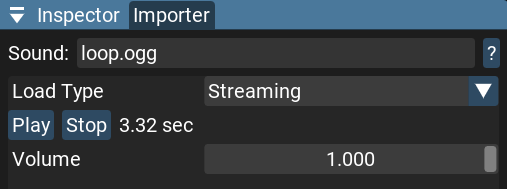
Load Type Options:
Auto - The engine decides per asset: large files are streamed, while short ones are decoded into memory. This is the default for new assets.
Streaming - Uses streaming decoding for the audio resource. This is good for long sounds, as it uses less memory and avoids CPU spikes on load, but decoding will use more CPU resources during playback.
OnLoad - Decodes the audio resource on load. This is good for short sounds, but can cause CPU spikes with very long audio files and stores all audio data in memory.
Play:
Plays the sound in the editor.
Volume:
Sets the default volume for the sound (from 0.0 to 1.0).
Sound Scripting
This is a simple example of how to request and play sound assets in code:
let soundId = request_sound("my_sound.wav")
play_sound(soundId)