
UIAnchor
Per axis the anchor works in one of two modes: a point anchor (anchorMin == anchorMax) keeps the frame size and only drives the position; stretching (anchorMin != anchorMax) recomputes the frame size from the parent.
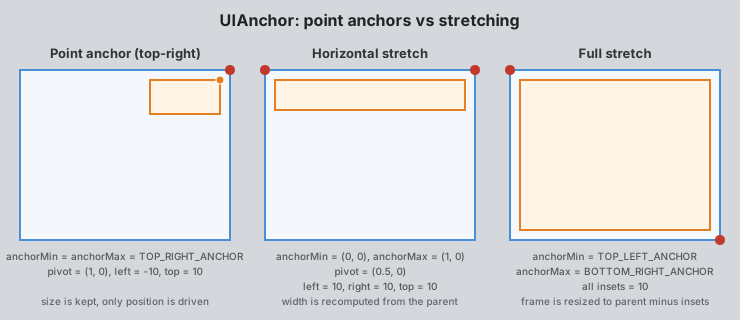
Anchoring overrides localPosition2D and, on stretched axes, size.
See also the UI Basics guide.
In the editor
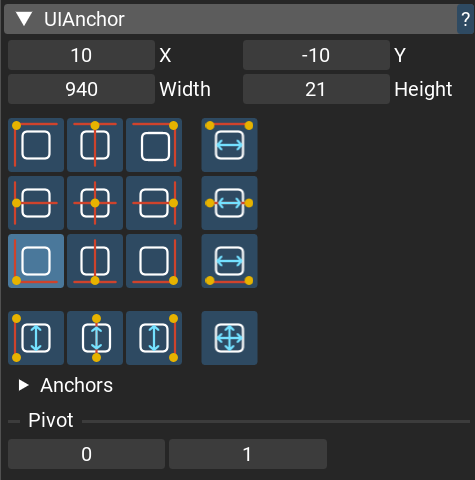
The UIAnchor has a custom inspector: a 4x4 grid of presets sets the anchor configuration in one
click (Alt + click also moves the frame onto the chosen anchor), with the pivot and the
position/size fields below it.
Classes
- UIAnchor : Component
Note
UIFrame component is automatically added to the node if it is not already present
This component adjusts node’s position according to the parent UIFrame, using a specified anchor value
and top, right, bottom, and left insets.
Top-left corner of the screen corresponds to anchor = float2(0, 0), bottom-right is anchor = float2(1, 1).
Note
If both anchorMin.x == anchorMax.x, the horizontal position is determined only by the left inset, the right inset is ignored. Similarly, if anchorMin.y == anchorMax.y, the vertical position is determined only by the top inset, the bottom inset is ignored.
Usage example:
var node = create_node()
add_component(node, new UIText(text:="Hello, world!"))

// text will be anchored to parent node with 10 pixels insets from all sides
add_component(node, new UIAnchor(
    anchorMin = TOP_LEFT_ANCHOR, // equivalent to anchorMin = float2(0, 0)
    anchorMax = BOTTOM_RIGHT_ANCHOR, // equivalent to anchorMax = float2(1, 1)
    top = 10,
    left = 10,
    right = 10,
    bottom = 10
))
- Fields:
anchorMin : float2 - Position anchor min value (top-left corner).
anchorMax : float2 - Position anchor max value (bottom-right corner).
left : float - Left inset in pixels.
top : float - Top inset in pixels.
right : float - Right inset in pixels.
bottom : float - Bottom inset in pixels.
- UIAnchor.apply_anchoring(frame: UIFrame?; parent: NodeId; parent_frame: UIFrame?)
Applies anchoring to the node using parent node. It is called automatically every frame.