
Model
Import Settings
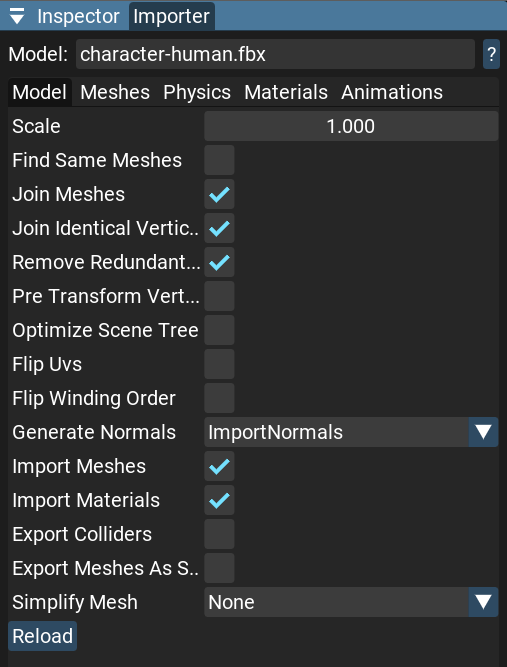
Scale: The global scale of the scene.
Find Same Meshes: Finds identical mesh instances and joins them into one.
Note
This post-process can take a while because it compares all meshes with each other by vertices.
- Join Meshes: Joins meshes with the same materials and vertex layout.
If a mesh has skinning, this process will be skipped.
Join Identical Vertices: Merges identical vertices to reduce vertex count.
Remove Redundant Materials: Searches for redundant or unreferenced materials and removes them.
Pre Transform Vertices: Applies node transformations to vertices. It can also merge meshes with the same materials into one mesh.
Optimize Scene Tree: Collapses and joins nodes without animations, bones, lights, or cameras assigned.
Flip UVs: Flips all UV coordinates along the y-axis and adjusts material settings and bitangents accordingly.
Flip Winding Order: Adjusts the output face winding order to be clockwise (CW). The default face winding order is counterclockwise (CCW).
- Generate Normals: Imports normals from the model file or generates them.
ImportNormals: Uses normals from the model. If normals are not present in the model, they will be generated.
HardNormals: Ignores normals present in the model and generates new ones. This procedure can increase the number of vertices.
SmoothNormals: Ignores normals present in the model and generates smooth normals. It can be more time consuming, but in most cases produces fewer additional vertices.
Import Meshes: Enables or disables importing meshes from the model file.
Import Materials: Enables or disables importing materials from the model file.
Export Colliders: Adds Collider components to each node with meshes if a collider has been built for that mesh.
Export Meshes As Static: Marks all meshes as
isStatic = true. This can be useful for optimization of static scenes.- Simplify Mesh: Reduces mesh complexity. Available levels:
None: No simplification.
Soft: Keeps at least 50% of triangles, max 0.5% bounding box error.
Medium: Keeps at least 30% of triangles, max 1% bounding box error.
Aggressive: Keeps at least 10% of triangles, max 5% bounding box error.
Reload: Forces a model asset reload.