
Collider
Collider defines parameters for interaction with other physics objects. The most important parameter is shapes, a collection of geometric volumes used in collision detection. The component also defines other collision parameters, such as friction, restitution, and collision layer. A node with only a Collider and no RigidBody will be static.
In the editor
The Collider has a custom inspector: each shape is listed with its translation, rotation, and size parameters. The Add button appends a shape, and a shape’s Edit button toggles editing it directly in the viewport. New colliders are also added by shape (Box, Sphere, Capsule, Cylinder, Mesh).
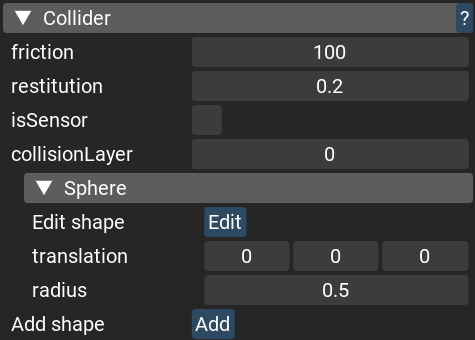
Networking
Replication of Collider is opt-in, see
Replicated engine components.
It arrives with its shapes, so a mirror has collision without a prefab.
Type aliases
- variant Shape
Represents a shape for a Collider. See .shape operator how to use it.
- Variants:
box : tuple<size:float3;translation:float3;rotation: quat4> - Represents a box shape
sphere : tuple<radius:float;translation:float3> - Represents a sphere shape
capsule : tuple<radius:float;height:float;axis: AxisDirection;translation:float3;rotation: quat4> - Represents a capsule shape
cylinder : tuple<radius:float;height:float;axis: AxisDirection;translation:float3;rotation: quat4> - Represents a cylinder shape
mesh : tuple<mesh: CollisionId;scale:float3;translation:float3;rotation: quat4> - Represents an arbitrary triangle mesh
empty : int - Represents no collider
Classes
- Collider : NativeComponent
A generic collider that can consist of several shapes.
Example:
let node = create_node()
add_component(node, new RigidBody())
add_component(node, new Collider(shapes = [
    box_shape(),
    sphere_shape(),
]))
- Properties:
- Collider.friction: float
- Collider.friction =(value: float)
The of friction of a body, which is used in collisions to calculate the combined coefficient of friction (COF) between two objects. The COF is calculated as sqrt(friction1 * friction2). A value of -1 means that it is set to what was set with set_default_friction(). See the guide on how to setup friction. Default value is -1.
- Arguments:
value : float
- Collider.restitution: float
- Collider.restitution =(value: float)
The restitution of a body, which is used in collisions to calculate the combined coefficient of restitution (COR) between two objects. The COR is calculated as max(restitution1, restitution1). This COR represents the “bounciness” of a collision and should be between 0 (perfectly inelastic collision) and 1 (perfectly elastic collision). The formula is Coefficient of Restitution = |Relative velocity of separation after collision| / |Relative velocity of approach before collision|. The default value is 0.0, but you can change it with set_default_restitution().
- Arguments:
value : float
- Collider.isSensor: bool
- Collider.isSensor =(value: bool)
Determines whether a body should be passable by other bodies. This is useful in combination with collision callback to make a trigger volume. Default is false.
- Arguments:
value : bool
- Collider.collisionLayer: uint8
- Collider.collisionLayer =(value: uint8)
Represents the collision layer that the body belongs to, with values ranging from 0 to 31. Collision layers can be set to collide or not collide with other layers using set_collision_layer_mask and set_collision_between_layers. It is recommended to define a custom global enum for collision layer names for better readability. Default is 0.
- Arguments:
value : uint8
- Collider.shapes =(shapes: array<Shape>)
Apply shapes for a Collider, replacing all shapes that was before.
Usage example:
add_component(node, new Collider())
get_component(node) $(var coll: Collider?) {
    coll.shapes = [
        box_shape(),
        box_shape(),
        sphere_shape(),
        ...
    ]
}
- Arguments:
shapes : array< Shape>
- Collider.shapes: array<Shape>
Get all shapes of a Collider.
- Collider.shape =(shape: Shape)
Change the shape of the collider.
This function internally recreates the collider, and may produce performance issues if using it too often. It is acceptable to use this function for on-off events, e.g. instantaneous changing the height of a character when it is crouching. It is undesirable to use this function every frame, e.g. smoothly changing the height of a character when it is crouching.
Note
Prefer to not using this function for moving the collider. E.g. if you have a sliding door and you want to move the collider, consider moving the position of the scene node instead.
- Arguments:
shape : Shape - The new shape
Usage example:
add_component(node, new Collider(shape = capsule_shape([height = 2.0])))
get_component(node) $(var coll: Collider?) {
    coll.shape = capsule_shape([height = 1.5])
}
- Collider.shapeCount: int
Get shape count of a Collider.
- Collider.shape: Shape
Get a shape of a Collider.
If the collider has many shapes, get the first shape.
Usage example:
add_component(node, new Collider(shape = capsule_shape([height = 2.0])))
get_component(node) $(var coll: Collider?) {
    // Get the height of the capsule
    let height = (coll.shape as capsule).height

    // Modify the height of the capsule
    coll.shape = capsule_shape([height = height - 0.5])
}
Functions
- box_shape(size: float3 = float3(1f, 1f, 1f); translation: float3 = float3(0f, 0f, 0f); rotation: quat4 = quat4()): Shape
Create box Shape for Collider
Usage example:
add_component(node, new Collider(shape = box_shape()))
- Arguments:
size : float3
translation : float3
rotation : quat4
- capsule_shape(radius: float = 0.5f; height: float = 2f; axis: AxisDirection = public_components::AxisDirection.YAxis; translation: float3 = float3(0f, 0f, 0f); rotation: quat4 = quat4()): Shape
Create capsule Shape for Collider
Usage example:
add_component(node, new Collider(shape = capsule_shape(0.5, 2.0, AxisDirection.YAxis, float3())))
- Arguments:
radius : float
height : float
axis : AxisDirection
translation : float3
rotation : quat4
- cylinder_shape(radius: float = 0.5f; height: float = 2f; axis: AxisDirection = public_components::AxisDirection.YAxis; translation: float3 = float3(0f, 0f, 0f); rotation: quat4 = quat4()): Shape
Create cylinder Shape for Collider
Usage example:
add_component(node, new Collider(shape = cylinder_shape(0.5, 2.0, AxisDirection.YAxis, float3())))
- Arguments:
radius : float
height : float
axis : AxisDirection
translation : float3
rotation : quat4
- get_shape(collider: Collider?; index: int = 0): Shape
Get one of the shapes of a Collider.
Note that to change a shape you need to call set_shape () : bool
If there is only a single shape in the Collider, consider using .shape operator instead.
- Arguments:
collider : Collider? - The Collider component
index : int - The index of the shape. Values < 0 are treated as an offset from the end of the list.
Usage example:
add_component(node, new Collider(shapes = [
    box_shape(),
    sphere_shape(),
)
get_component(node) $(var coll: Collider?) {
    let sphere = get_shape(coll, 1) as sphere
    let radius = sphere.radius
}
- get_shapes(collider: Collider?; result: array<Shape>): int
Get all shapes of a Collider.
This is a more optimized version of .shapes which does not allocate an array
- mesh_shape(mesh: CollisionId; scale: float3 = float3(1f, 1f, 1f); translation: float3 = float3(0f, 0f, 0f); rotation: quat4 = quat4()): Shape
Create mesh Shape for Collider
Usage example:
let collisionId = request_collision_from_model("cube.fbx", "Cube0")
add_component(node, new Collider(shape = mesh_shape(collisionId)))
- Arguments:
mesh : CollisionId
scale : float3
translation : float3
rotation : quat4
- set_shape(collider: Collider?; index: int; shape: Shape): bool
Change a shape of a Collider. If the collider has many shapes, provide an index of the shape that will be changed.
This function recreates all the shapes of the collider, and may produce performance issues if using it too often. It is acceptable to use this function for on-off events, e.g. instantaneous changing the height of a character when it is crouching. It is undesirable to use this function every frame, e.g. smoothly changing the height of a character when it is crouching.
If there is only a single shape in the Collider, consider using .shape= operator instead.
Note
Prefer to not using this function for moving the collider. E.g. if you have a sliding door and you want to move the collider, consider moving the position of the scene node instead.
- Arguments:
Usage example:
add_component(node, new Collider(shape = capsule_shape([height = 2.0])))
get_component(node) $(var coll: Collider?) {
    set_shape(coll, 0, capsule_shape([height = 1.5]))
}
- sphere_shape(radius: float = 0.5f; translation: float3 = float3(0f, 0f, 0f)): Shape
Create sphere Shape for Collider
Usage example:
add_component(node, new Collider(shape = sphere_shape()))
- Arguments:
radius : float
translation : float3