
Outliner
The Outliner is the scene-tree panel. It lists every node in the scene as a hierarchy; selecting a node here also selects it in the viewport and shows its components in the Inspector. At the top are a + button for creating nodes and a search field.
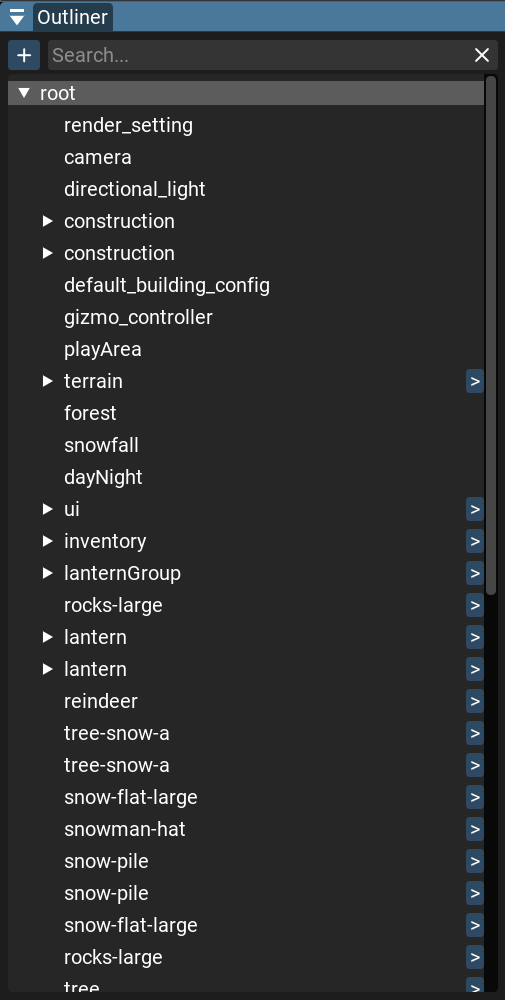
The tree
Search — the field at the top filters the tree by node name; while it is active the tree is shown as a flat list of matches. Its × button clears the filter.
Expand / collapse — use the arrows on nodes that have children.
Select — click a node to select it.
Ctrl+ click toggles individual nodes,Shift+ click selects a range. Click empty space to clear the selection.Focus — double-click a node (or press
F) to focus the camera on it.Reorder / reparent — drag a node onto another to reparent it, or between nodes to reorder.
Instantiate — drag a prefab or model from the Project panel into the tree to add it to the scene.
Prefabs — prefab instances are shown in the accent color. Prefab and model instances also have a > button on the right: it opens the prefab source, or for a model highlights its source file in the Project panel.
Creating nodes
The + button (or right-clicking empty space) opens the Create Node menu. New nodes are
created at the camera’s position — hold Ctrl while creating to place them at the origin instead.
Create Empty Node — a node with no components.
Camera — a node with a camera component.
Light — a directional, point, or spot light.
Mesh — an empty mesh, or a primitive (Capsule, Cone, Cube, Cylinder, Plane, Prism, Pyramid, Quad, Sphere).
UI — a UI element:
Interactive — Button, Colored Button, Textured Button, Checkbox, Text Input, Dropdown List, Vertical Slider, Horizontal Slider, Scroll Area.
Layout — Anchor, Flow Layout, Horizontal Layout, Vertical Layout.
Render Settings — a node with the scene’s render-settings components.